

How to Create Coupons in WooCommerce

Do you want to boost your store sales and keep the customers coming back? Offering discounts is one of the most powerfull way to attract customers to increase sales. In the fast-growing e-commerce world, around 80 to 85 percent of customers prefer to purchase products at discounted prices and are even willing to switch brands because of a discount.
So, to increase sales and customer conversion, offer an attractive discount to the customer by using coupon codes. These coupon codes are a combination of text or numbers that customers can enter at checkout to receive a discount. WooCommerce makes this process easy by allowing store owners to create and manage WooCommerce coupon codes directly through the dashboard. It gives you the flexibility to boost your holiday season sales, enhance the reward or loyalty programs, and offer special promotions to encourage new customers to make a purchase.
In this article, we will explore what WooCommerce coupons are, how to apply them, and how to create discount and unique coupon codes efficiently.
Why Are Coupon Codes Important?
Coupon codes are a powerful promotional tool that offers customers special discounts at checkout. When customers enter a coupon code, they receive a discounted price or a special offer. So the store owners can configure coupon codes to provide a percentage discount, fixed amount discounts, or free shipping. Additionally, you can specify the payment methods, such as WooCommerce Payment Gateway, to complete their purchase and also control coupon usage by defining minimum cart values, product or category restrictions, and usage limits.
Coupon codes are not just about offering discounts. They directly influence customer buying decisions, improve conversion rates, and support long-term store growth. Below are the key benefits of using coupon codes to increase sales and conversions.
1. Increase Conversion Rate at Checkout
The main reason is that the customer leaves the cart abandon is pricing. If you offer a coupon code or discount, you will give a reason for customers to complete their purchase instead of abandoning the cart. When customers enter the coupon and see the discounted price at checkout, they feel they are getting extra value. Even a small percentage discount or a free shipping coupon can significantly encourage customers to place an order. This process can build your customer trust and also increase your store conversion.
Read More: How To Protect Your WooCommerce Stores From Fraud
2. Attract Price-Sensitive Customers
Some customers are price sensitive, so they prefer to purchase products only when a discount is available. These customers actively search for coupon codes before making a purchase decision. To attract these customers, you can offer coupon codes to target them and prevent them from buying from your competitors.
To attract the customer, you can:
- Offering special discounts for first-time purchases.
- Running seasonal sales or limited-time offers.
- Providing an exclusive deal for quick purchases.
3. Boost Average Order Value
Coupon codes are mostly designed to motivate customers to buy more. With Woocommerce coupon, you can offer multiple discounts, such as offering 10% off on minimum purchases, buy two items and get 30% off, or free shipping above a certain cart value, to encourage customers to add more products to their cart. These strategies can increase your store sale that can increase the rate of your order value.
4. Easily Promote Specific Products or Categories
With WooCommerce coupon codes, you can promote slow-moving products or specific categories. To promote this, you can:
- Offer seasonal discounts on selected items.
- Clear old stock by offering an exclusive coupon.
- Launch special offers to highlight new products.
This approach can help to balance inventory and improve overall product visibility.
5. Re-Engage Inactive Customers
Coupon codes are very effective for bringing back those customers who are inactive. With this, you can send personalized or unique coupon codes to the customers that make them feel valued and also remind them of your store. This method can build your customer trust and increase your repeated purchase.
Improve the Performance of Marketing Campaigns
You can easily integrate coupon codes with marketing campaigns such as email marketing, social media ads, or influencer promotions, which can improve overall campaign performance. It allows you to:
- Monitor campaign performance accurately.
- Measure conversions from each channel.
- Optimize your marketing budget more effectively.
By attaching coupon codes to platforms like Instagram, email, or other channels, you can clearly identify which campaigns drive the most sales. Additionally, you can also restrict coupon usage to prevent fraud using WooCommerce Fraud Prevention, ensuring that coupons shared during promotional campaigns don’t get misused by a wide audience.
How to create a WooCommerce Coupon Code?
Here are the Steps that you can follow to create the coupon codes:
Step-1: Enable the Coupon Code
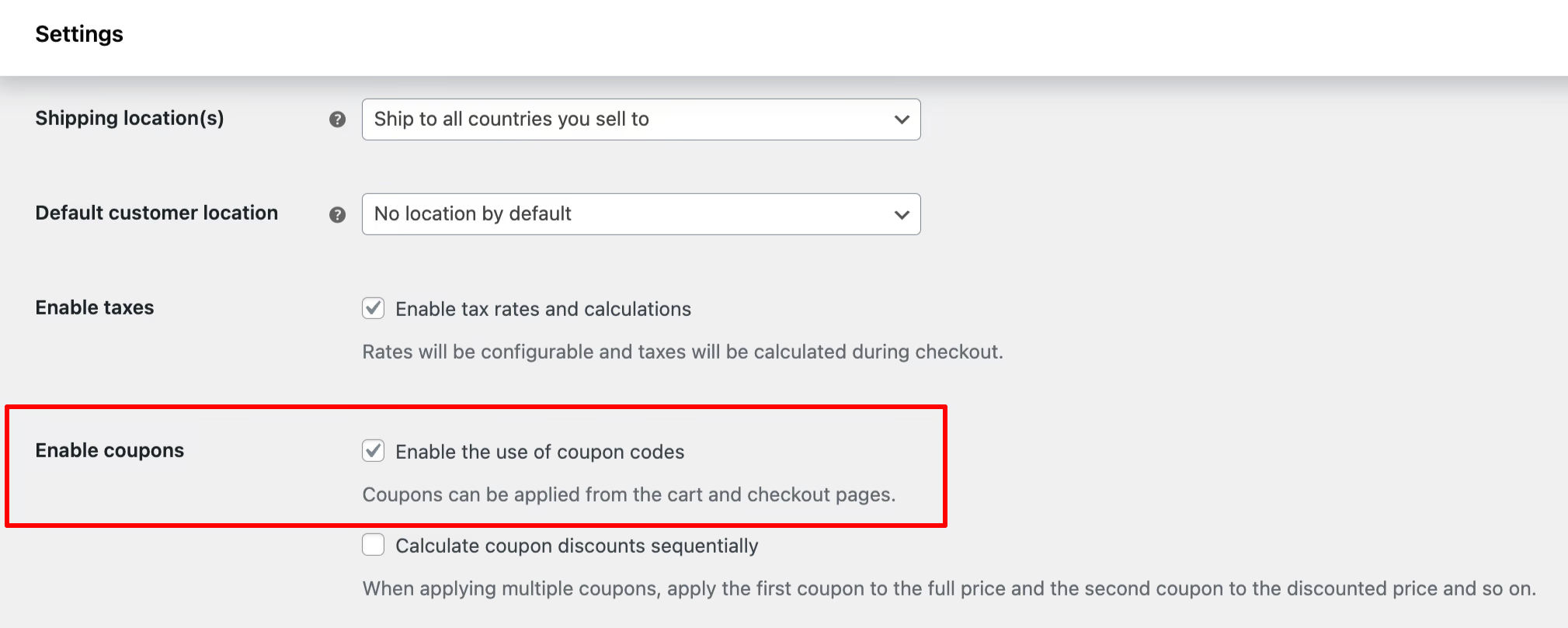
- Go to the WooCommerce → Setting→ Gernal Setting
- Scroll down → Enable the desired option, such as:
- Use of a coupon code option or
- Calculate the coupon discount sequentially
- Save Settings
After this, the coupon will be displayed on your dashboard.
Step-2: Go to the Coupon Section
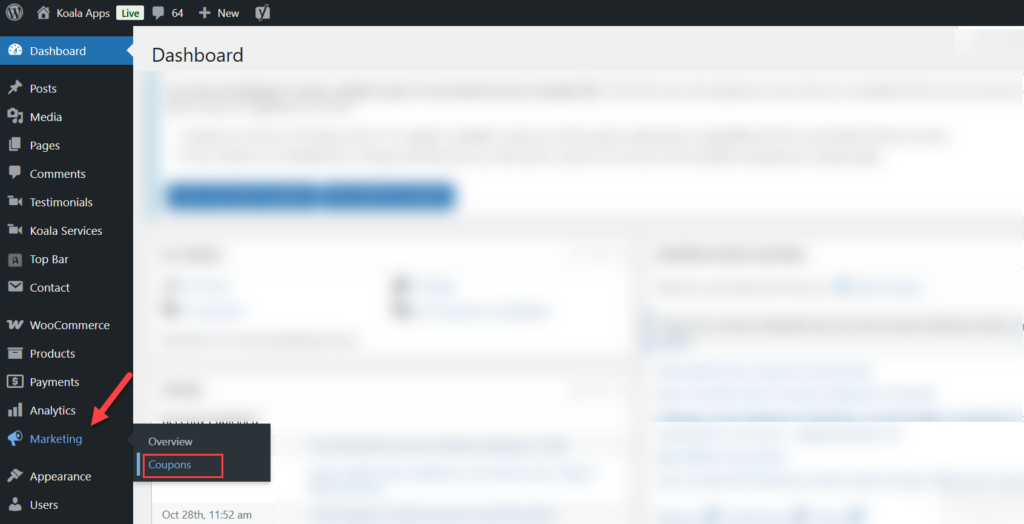
- Open the wordpress dashboard
- Go to the marketing section
- Select the coupon option from the dropdown.
- If coupons are already created, they are displayed in a grid view. If this is your first coupon, you can create a coupon by clicking on the Add New Coupon option.
- Click it to start.
Step-3: Add your Coupon Code

- Add the custom coupon code in the coupon code field.
- Generate the default coupon or add any desired string or word to the coupon.
- You can also add the description for internal reference.
Step-4: Set the discount type and value
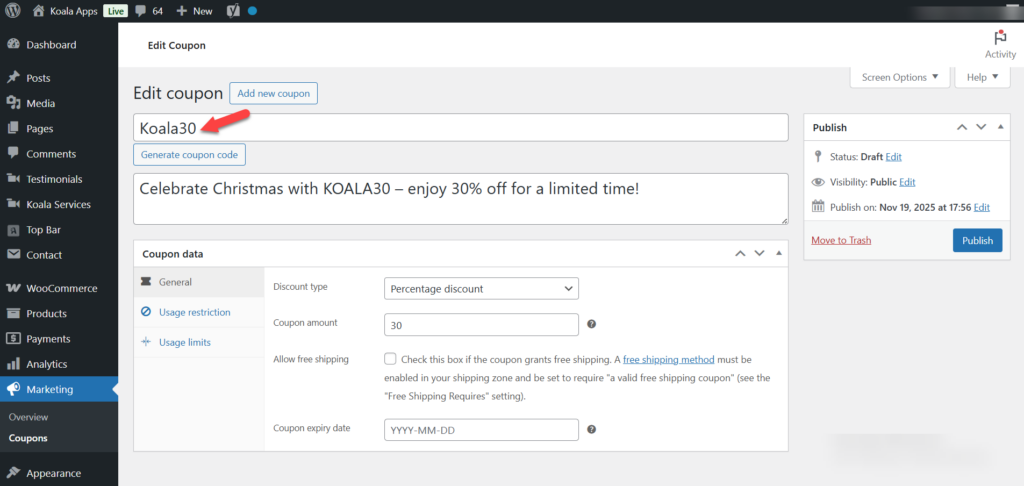
- Go to the Coupon General Setting
- Select the discount type, such as fixed or percentage discount, from the dropdown.
- Add the value or amount of the discount.
- You can enable or disable the free shipping, and also add the expiry date of the coupon.
Step-5: Add the Restrcition & Limitation
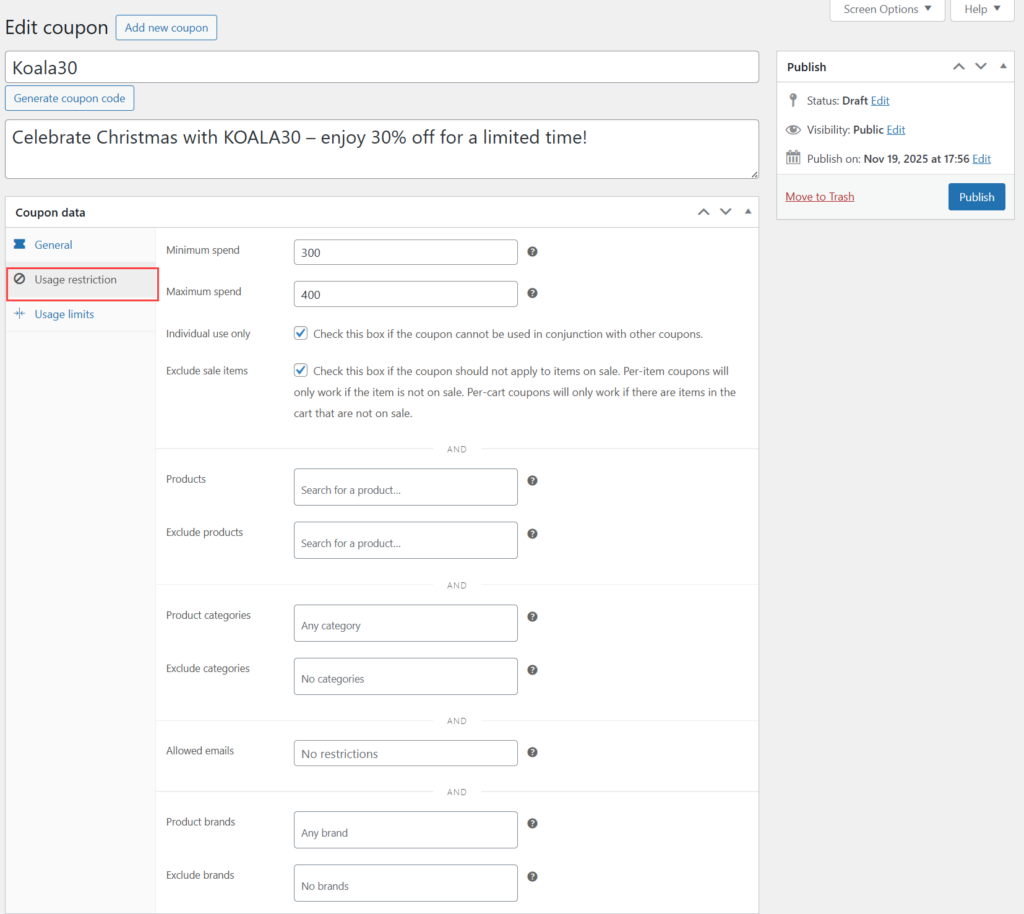
You can control the usage of the coupon code by setting the following restriction:
- Set the maximum or minimum limit of spending.
- Restrict them for individual use, so the customer cannot share this coupon with others.
- Exclude the sale items.
- Apply the coupon only for the specific product or categories.
- Allow the billing email address.
- Set the usage limit of the coupon, e.g., how many times the customer uses this coupon to avail a discount.
Step-6: Publish Your Coupon
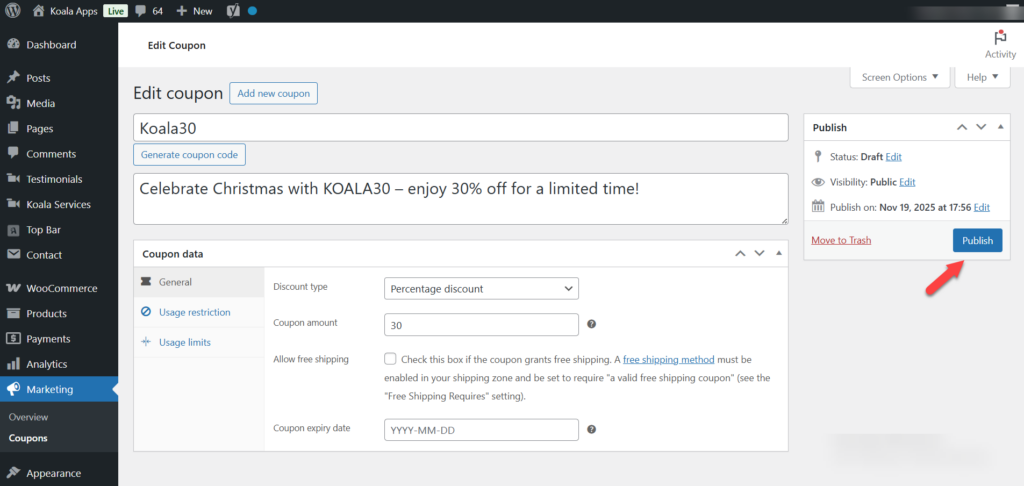
Once you complete all modifications, click on the Publish button to implement. Now your coupon is ready for the customer to use at checkout.
Tips for using discount and Coupon codes
Here are some tips or tricks for Woocommerce token:
- Create a unique token for a limited or seasonal sale, which can reduce the risk of sharing.
- Share the code in emails, social media, or display on popup. So most of the customers can easily use it.
- Send code to the customer when they leave the cart abandonment or perform signing up, it can encourage the customer to complete their purchase.
Conclusion
With WooCommerce coupons, it’s easy to drive additional purchases and continued long-term customer loyalty. WooCommerce allows you to offer discounts via coupon codes to attract new customers to make their first purchase, drive repeat purchases, sell through inventory, or increase average order amounts.
WooCommerce coupons offers an integrated approach through which merchants may handle their entire coupon life cycle (creating, managing, and tracking) without requiring significant technical knowledge. Additionally, using smart coupon strategies (i.e., limited-time coupon codes, discount promotions, and targeted customer promotional codes) can help turn more visitors into purchasers and help merchants grow their stores more effectively.
FAQS
1: How many types of coupons can I create in WooCommence?
Ans: WooCommerce default coupon allows you to create a percentage discount, fixed discount, fixed cart discount, and offer free shipping coupons. All coupons are chosen based on your promotional goal.
2: Can I restrict the WooCommerce coupon code for specific products and categories?
Ans: Yes, the WooCommerce coupon codes allow you to create a unique coupon code and apply them on the specific products and categories. This process is very useful for promoting the new item or clearing old stock or slow-moving products.
3. How can we reduce cart abandonment by using coupon codes?
Ans: You can offer a discount or free shipping coupon at the time of checkout, which encourages the customers to complete their purchase. This is a small incentive that can significantly reduce cart abandonment and increase your store sales.
4. Is it possible to limit the usage time of the coupon?
Ans: Yes, a WooCommerce coupon code allows you to set maximum or minimum limits per coupon or per user. This can help you to prevent misuse and keep your discount campaigns under control.
5. Can I track the performance of coupon codes in WooCommerce?
Ans: Yes, you can integrate the coupon code with your promotional campaign whicn provides you a details reports that allow you to track coupon usage, total discounts given, and revenue generated.